Building SF Ledger
Why build SF Ledger and what I learned along the way.
Building SF Ledger
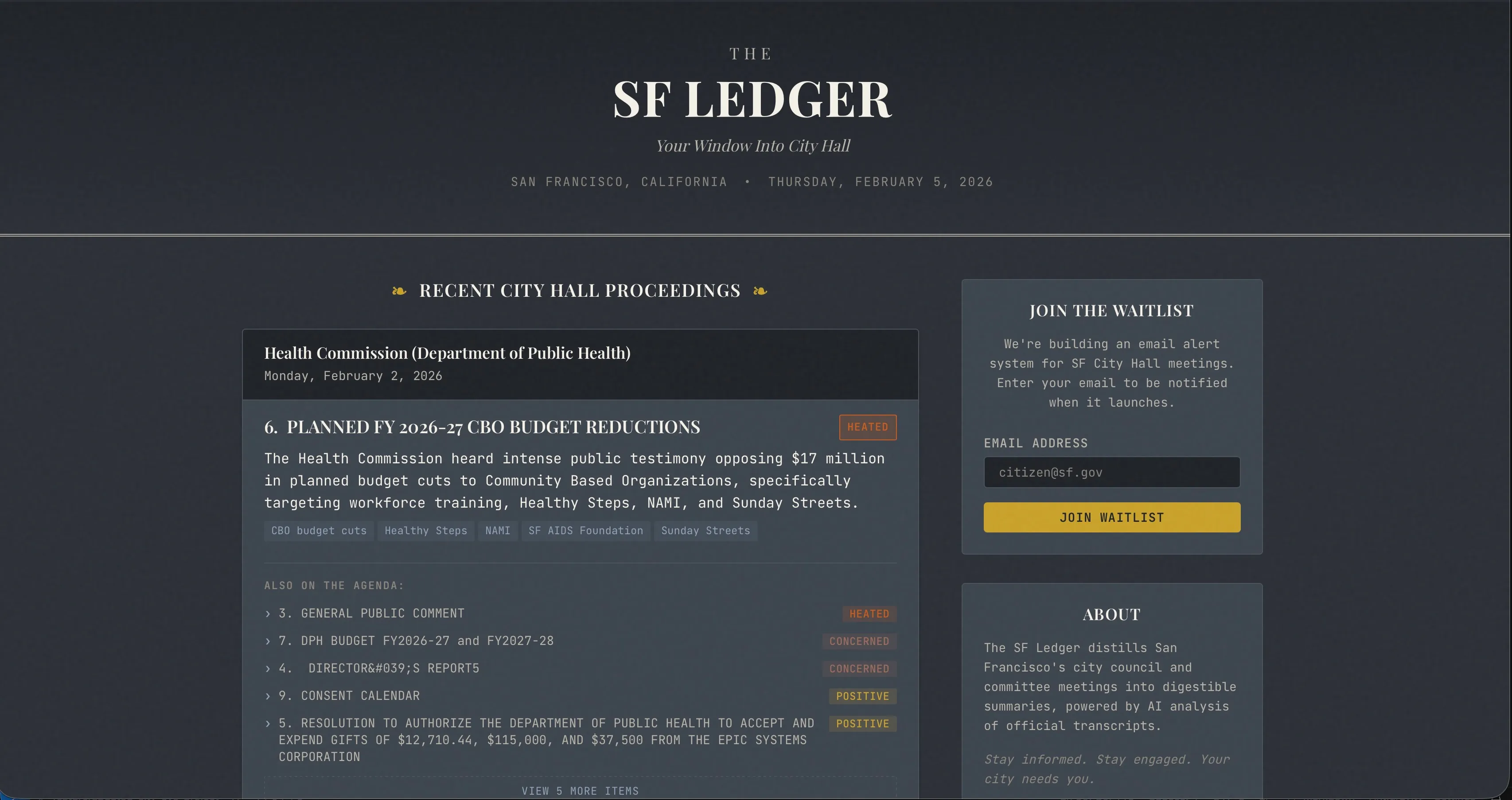
For the past couple of weeks, I’ve been building SF Ledger. It’s a platform that makes San Francisco city government meetings accessible and understandable for the average person. Today, it’s live.
The Problem
If you’ve ever tried to follow what’s happening at San Francisco City Hall or really any city hall, you know it’s not easy. Meeting schedules are scattered across different commission websites. Agendas are dense PDF documents and unless you have hours to watch recordings, you’ll miss the discussions that might affect your neighborhood, your business, or your daily life.
Real estate developers, non-profits, and civic-minded residents all face the same challenge: visibility into city hall decisions is fragmented and time-consuming.
Why I Built This
I’ve always been interested in how technology can make politics and government functions more accessible to the average person. The data is technically public in most cases, but is either difficult to access, parse, or really just not easily digestible for the average person.
SF Ledger is my attempt to fix that with San Francisco.
The Tech Stack
Building this required pulling together several pieces:
Scraping & Data Pipeline
- Simple GET Requests for scraping meeting agendas, captions and video links from SFGOV.tv
- GitHub Actions for scheduled scraping jobs with resilience built in. If new meetings are detected, it publishes the new meeting items to the backend
Backend
- Cloudflare Workers Serverless backend (no cold start issues), easy configuration, and quite cost-effective
- Cloudflare D1 (SQLite) for storing meeting data and processed items
- Gemini 3 Pro for summarizing lengthy agenda items into digestible takeaways
Frontend
- Simple, fast static site that pulls from the API
- Clean interface focused on readability
Learnings
1. Managing Context is Key
The summaries Gemini generates are pretty good at capturing the heart of dense meeting discussions. But trying to process meetings all in one go regularly caused the output to get truncated.I later structured this into batches to avoid overloading the context window. While ‘context rot’ can occur in long LLM sessions, batching ensured the summaries stayed sharp and focused on the specific agenda items at hand. Doing things all at once means less requests to Gemini especially when dealing with the free tier but batching a number of items together is more reliable and still feasible on the free tier.
2. Resilience > Speed
Relying on scheduled jobs to scrape external sites especialy when Github Actions on the free tier even when scheduled only runs when there’s available capacity to run the script. I built a catch-up mechanism that checks a 48-hour window and only processes new meetings. Initially I built manual workarounds but I later built a solution to just manually catch missed meetings due to failrues either in my worker or canceled job due to the free infrastructure this all runs on.
3. Cloudflare Workers + D1 is a solid choice for hobby projects
Workers + D1 gave me a globally fast API without managing any servers. Haven’t had much experience with serverless platforms but it was easy to get started with and get working with little work besides connecting to github. In addition, having seen how cold starts can be an issue on some platforms, it’s great to be able to avoid that on Cloudflare compared to AWS Lambdas for instance.
4. Be willing to Pivot
I initially wanted to cover multiple cities and introduce a whole load of features but for a simple project, it made sense to start small. Focusing on just San Francisco let me go focus on what matters and the specific quirks behind how this informaiton is exposed. While SF (through Legistar) has an API to retrieve information, it’s not up to date nor is the API properly setup to provide live information to any consumers. After experimenting with the API for a bit and realizing it wasn’t possible in that avenue, i did some back and forth with Gemini and realized i could just scrape the information and utilize some undocumented APIs to get the information i needed. Now this does make things quite fragile should the traffic scale quite a bit, it’s perfectly sufficient for a hobby project.
What’s Next
SFLedger is live, but it’s just the beginning. I’m exploring:
- Keyword alerts — get notified when topics you care about come up (this is a feature i’m most excited about and what made me want to build this to begin with)
- Historical search — query past meetings for specific topics (Ideally utilize an LLM so you can chat about a meeting and ask questions about it as though you’re present within it)
- Expansion to more Bay Area cities. Something similar actually exists in nyc called citymeetings.nyc, and the most similar thing for SF i could find was peoplespalacesf.com but that didn’t have the main features i had in mind when i started building. I think they could be complementary tools alongside Legistar for related meeting documents.
If you’re in San Francisco and want to stay informed about what’s happening at City Hall, check out sfledger.com.
Have thoughts, feedback, or just want to chat about this project? I’d love to hear from you — reach out on Twitter or email.